The login is referred to as signing in or authenticating, is the process by which a user gains
access to the Ripple Integrated Library system, application, or service by providing valid
credentials, typically a username and password.
1.1 Login as RILS Registered User
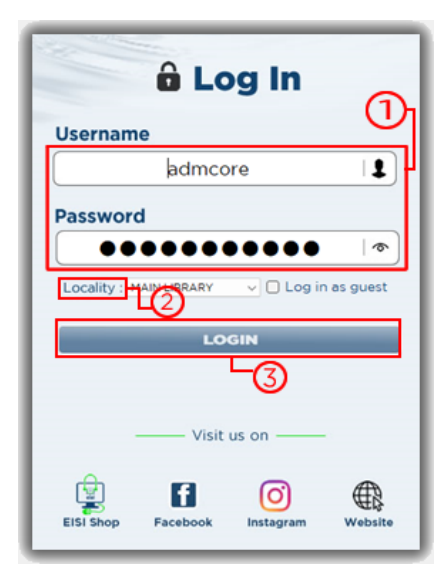
Steps to Log in as a RILS Registered User
1. Type in your Username and Password
2. Select the desired Locality
3. Click on Login button
Note: This will display the home page of the Ripple
integrated Library System
1.2 Login as Guest User
Login as a guest user is a special feature in the Ripple Integrated Library System, designed
for unlimited browsing of available collection. It allows users to access the system without
the need for a personalized account.
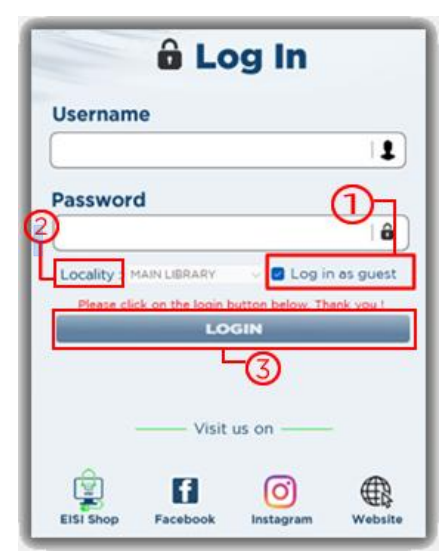
Steps:
1. Click the check box Login as guest
2. Click on Login button
Note: This will this display the Catalog Library search
page.
1.3 Logout Process
When you “logout, you are effectively ending your session or access to a particular system.
It is commonly used to ensure that unauthorized access is prevented.
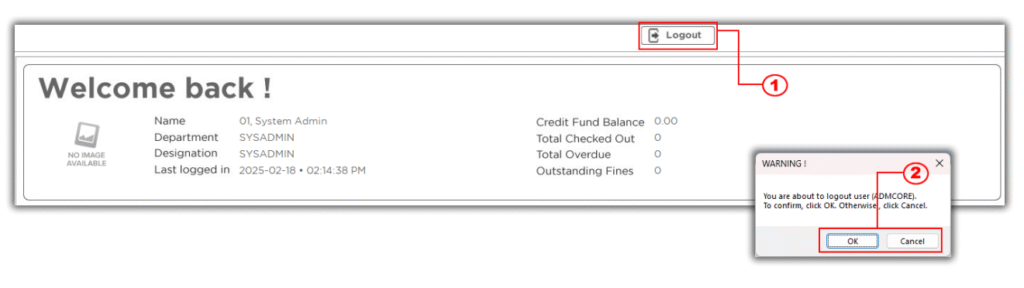
Steps to Logout
1. In the Menu Bar Click the Logout Button
2. A display message will show “Your about to logout () To confirm click Ok button
otherwise click cancel.
Please Refer to the Image Below
Note: To close the RIL system Press ALT+F4